
Recently I have been needing a low-cost and low-maintenance hosting and deployment option for my growing portfolio of software projects (thanks Claude). Normally this would look like me going to a cloud provider, such as AWS, and starting the process of provisioning servers and configuring them. I might opt for a platform like Laravel Forge to ease management. Whatever option I chose, I would eventually find myself spending more time and more money than I cared for. I might decide it's just not worth the effort to bootstrap a small idea or eventually decommission a site because I was tired of paying for it. To solve this, I decided to take a look at Cloudflare's Workers and Containers.
What are Cloudflare Workers?
If you have spent time in the cloud architecture space then you have almost definitely heard of Cloudflare. You are probably most familiar with their DNS, CDN, and security offerings. But are you aware that Cloudflare has also been entering into the compute and storage markets? Enter the Cloudflare Worker.
Originally released in 2018, Cloudflare Workers have become a full-on offering in the serverless hosting arena. They are the tip of the spear in Cloudflare's compute offerings, offering a powerful and simple way to run code globally on Cloudflare's edge network. They are fast and they are cheap. So far, so good.
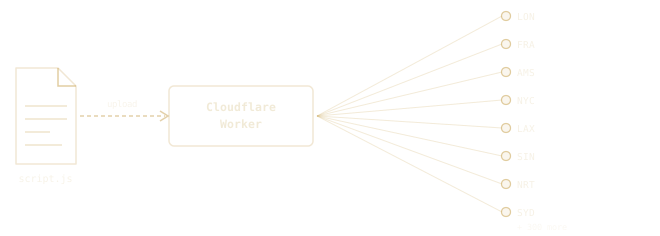
Here are some key points:
- They are V8 Isolates using the workerd runtime
- Support for modern JavaScript and TypeScript and a select few other languages
- Near-instant cold starts (typically 5–50ms; no container initialization overhead)
- Deployed to Cloudflare's edge network
- Tight integration with other Cloudflare services, such as storage and other compute services.
- Cheap, cheap, cheap
Here are some of the possibilities with Cloudflare Workers:
- Hono
- Astro
- Nitro
* Cloudflare Pages is another, possibly better, sister service for targeting static and minimally dynamic sites.
What are Cloudflare Containers?
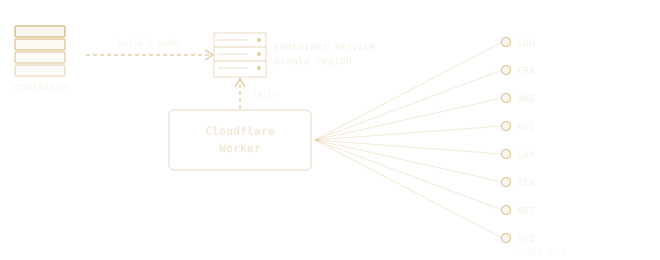
Next we have a more recent offering. Cloudflare Containers (in Beta as of Q2 2026) allows you to host your own containers that you build and push to Cloudflare. Cloudflare Containers are a bit different from traditional container hosting and lack some of the efficiency of Cloudflare Workers. Nevertheless, this opens the possibility to host whole new stacks that otherwise can't run on a worker but can run on a container. This includes more traditional stacks such as Laravel and Ruby on Rails.
Each container instance runs inside a Durable Object that is attached to a Cloudflare Worker. That means they aren't public-facing. All requests to your containers must be routed through a worker. You choose a container size and are billed while a container is running. A bit more on this later.
Here are some of the possibilities with Cloudflare Containers:
- Laravel
- Symfony
- Ruby on Rails
- Django
- REST and GraphQL APIs
- Background job processors
- Data pipelines
- Legacy services that can be containerized
Additional benefits
Automatic deployments with GitHub
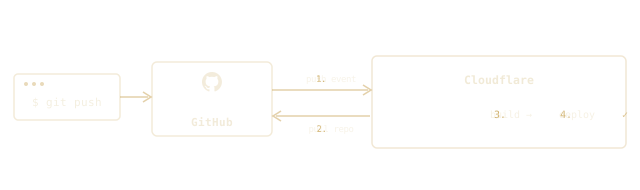
You don't need to set up a CD pipeline to deploy your worker. You just need to install the Cloudflare app into your GitHub account, grant access to the target repo(s), and set that repo on your worker. Every time you push to the target branch, it will automatically deploy to your worker.
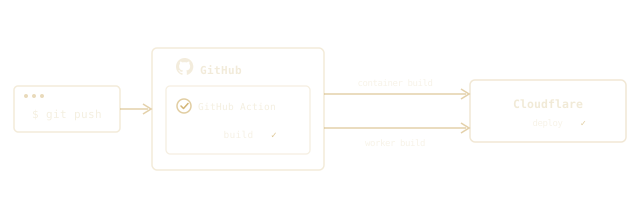
Containers still require a traditional CD pipeline to perform a build and push of the container. For this, you can use a GitHub Action to build the container and push to Cloudflare.
No CDN or DNS to manage
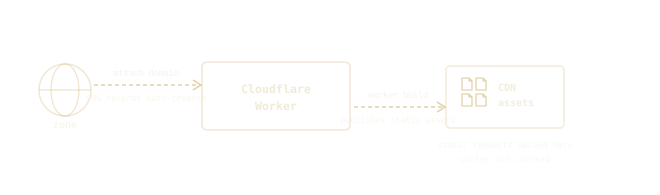
Hook your workers to domains and let Cloudflare create and manage the DNS records. Since this is Cloudflare, of course, that means everything automatically sits behind Cloudflare's suite of other services. CDN and caching. SSL is automatic. WAF deployed with the click of a button.
Worker builds can publish their static assets directly to Cloudflare's CDN. This avoids serving those static assets from the worker and saves on worker requests.
Integration with other services
Each of these services is provisioned directly from the same Cloudflare dashboard. Once created, you attach or reference them in your worker configuration with no external credentials to manage, no IAM policies to wire up, and no SDKs that need a secret injected at runtime. The binding is declared in wrangler.jsonc and Cloudflare makes it available inside the worker as a typed object.
Here is a curated list of other compute and storage services you can easily interface with from within a worker and/or container:
| Service | Description |
|---|---|
| R2 ↗ | S3-compatible object storage |
| KV ↗ | Simple Key-Value storage |
| D1 ↗ | SQLite Databases |
| Queues ↗ | Managed queues |
| Browser Rendering ↗ | Headless browser service |
| Email Sending ↗ | Outbound e-mail |
| Email Routing ↗ | Inbound e-mail |
| Observability ↗ | Logs |
| Hyperdrive ↗ | Accelerated access to existing databases |
Live tests
To stay true to my show-me state roots, let me show you several examples with live runners. Each link is a separate worker that I have built and deployed. They each host a relatively simple homepage that tracks some metrics about its performance. All workers are backed by Supabase instances in the same region.
| Framework | Worker | Container | Database | Cold Start + SQL query |
Warm Start + SQL query |
|---|---|---|---|---|---|
| Hono ↗ | Yes | No | Supabase + Hyperdrive |
<100ms | <10ms |
| Ruby on Rails ↗ | Yes | Yes | Supabase | >1.5s | <0.5s |
| Laravel w/ Octane ↗ | Yes | Yes | Supabase | >1.2s | <0.75s |
| Laravel ↗ | Yes | Yes | Supabase | >1.2s | <1.2s |
Cold Start + SQL query includes both the container cold start time and a single database round trip. Warm Start + SQL query is measured after the container is already running.
An interesting note is that you could run all of the above on a single worker. Bring a mix of vanilla JS and/or framework. Route part of your app to Laravel. Route another part to Ruby on Rails.
Hono
The speed of a Cloudflare Worker-only implementation is unmatched for bootstrapping and efficiency. The Hyperdrive service that proxies Supabase appears to outperform Supabase's transaction pooler. There's no wasted time waiting for a container to cold start, and no wasted expense from a container running while not in use.
Live instance: hono.cloudflare-worker.delamatre.com ↗
Ruby on Rails
Rails has slightly slower cold starts than Octane, but it makes this up with speedy warm starts of <0.5s. I would have no qualms running a Rails app this way.
Live instance: rails.cloudflare-worker.delamatre.com ↗
Laravel w/ Octane
When running Octane you get slightly slower cold starts than standard mode, but improved warm starts. This is expected since Octane bootstraps your application and stores it in memory. With warm requests around .75s this is a pretty easy performance boost to make for your Laravel application's that are designed to use Octane.
Live instance: laravel-octane.cloudflare-worker.delamatre.com ↗
Laravel ("standard" mode)
Of the container options, Laravel gives the most steady performance. As with a typical PHP request, each request is isolated and doesn't share memory or long-lived database connections. In my opinion, this is generally acceptable performance for complex backend systems. My tests were using lite containers so performance might be improved by upgrading to larger containers (budget permitting). Your users won't necessarily be impressed with your site's speed like Hono but it gets the job done.
Live instance: laravel.cloudflare-worker.delamatre.com ↗
Pricing
Worker pricing
Workers are unbelievably cheap. Cloudflare offers a free plan with generous limits that allows you to host many sites for free. If you want more workers or need containers, you will need to move up to a paid worker plan, but that starts at only $5/month and also includes a generous amount of usage before incurring overages. Let's take a look at worker pricing (6/9/2026):
| Free plan | Standard plan | Standard overage | |
|---|---|---|---|
| Price | $0 | $5 / month | — |
| Requests | 100,000 / day | 10,000,000 / month | $0.30 per additional million |
| Duration | No charge or limit | No charge or limit | — |
| CPU time | 10 ms / invocation | 30,000,000 ms / month | $0.02 per additional million ms |
CPU time is capped at 5 minutes per invocation (default: 30 seconds), or 15 minutes per Cron Trigger or Queue Consumer invocation.
It's worth noting that Workers are billed on CPU time rather than execution time. If your application spends most of its time waiting on a database or external API, your bill may be significantly lower than you would expect from traditional serverless platforms.
Worker pricing calculator
Enter your request volume and average CPU time per request to estimate a monthly bill. The fit check tells you whether your usage stays inside the Free plan, and "Apply Workers Paid included monthly usage" nets out the allowances bundled with the $5 plan.
CPU time is how long your code is actively executing — time spent waiting on a database, API, or other I/O isn’t counted. Most simple JSON/HTML workers use well under 50 ms per request.
Workers bill on CPU time, not wall-clock duration — time spent waiting on external services is not charged. Duration is not billed.
Estimated monthly cost
+ $5.00 Workers Paid base plan
Estimate only. Included allowances and overage rates per Cloudflare's published Workers pricing; verify against your account before relying on it.
Container pricing
Containers use a different model and require upgrading to a paid Workers plan ($5/month). That plan includes a monthly allowance before metered charges begin. Past that you pay per second of running time (pricing as of 6/13/2026):
| Free plan | Standard plan | Standard overage | |
|---|---|---|---|
| Price | Not available | $5 / month | — |
| Memory | Not available | 25 GiB hours | $0.0000025 per GiB second |
| CPU | Not available | 375 vCPU minutes | $0.000020 per vCPU second |
| Disk | Not available | 200 GB hours | $0.00000007 per GB second |
The key difference from Workers is what you pay for. Memory and disk are billed on the instance size for as long as it runs, while CPU is billed only when it is active. So a container kept warm to avoid cold starts keeps billing memory and disk the whole time it's up. That is why a container can cost more than a worker even at modest traffic.
Container pricing calculator
Pick an instance size and a usage profile below to estimate a monthly bill. Leave "Apply Standard plan's included monthly usage" on to net out the allowances bundled with the $5 plan, or turn it off to see gross metered cost. Toggle on the Worker and Durable Object estimate to account for the request and routing layer that always sits in front of a container.
Estimated monthly cost
+ $5.00 Workers Paid base plan (required, not included above)
Estimate only. Active-CPU billing, free-tier allowances, and overage rates per Cloudflare's published pricing; verify against your account before relying on it.
Gotchas
Cloudflare Workers and Containers can replace a decent portion of your traditional hosting infrastructure. But they're still lagging in a few ways for now.
Worker limits
Cloudflare Workers have hard limits that are worth knowing before you go all-in.
| Limit | Free | Standard |
|---|---|---|
| Workers per account | 100 per-account | 500 per-account |
| Script size (gzip compressed) | 1 MB | 10 MB |
| Memory per invocation | 128 MB | 128 MB |
| Subrequests per invocation | 50 | 1,000 |
| Environment variables | 64 | 64 |
| Environment variable size | 5 KB | 5 KB |
The worker and script size limits are the ones most likely to catch you off guard. The script size limit applies to your compiled worker bundle. Static assets uploaded separately to the asset layer do not count toward it, which is good news if you are serving a large frontend app.
Databases, databases, databases
Here are your options for running a database:
- D1 - A SQLite database service from Cloudflare
- Host your own - Set up your database on a third party (Neon, Supabase, RDS, etc.) and connect to it from your worker and/or container
- Hyperdrive - Host your own database (see above) and connect to it through Hyperdrive. This option doesn't work for Cloudflare Containers.
- Container - You could technically host a database on a Cloudflare Container. Disk does persist across restarts, but it isn't replicated or backed up, and it's wiped if the container is evicted or rescheduled to a different host. D1 or an external database is still the safer choice.
What's notably missing is a MySQL or Postgres offering from Cloudflare. This means that you either need to architect around this limitation or you need to bring your own. Using Hyperdrive can help reduce some of the overhead of bringing your own database, but it's limited to use directly on the worker (i.e. not a container). The moment you bring in a MySQL or Postgres database, the latency starts to edge your application towards that of a traditional application, especially if you are using a container.
Containers must be accessed through a worker
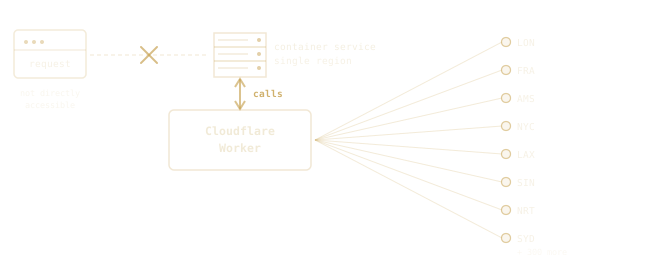
I already mentioned this above, but it bears repeating. Each container instance runs inside a Durable Object that is attached to your worker. In this way, the worker acts as a sort of router that you can fully customize. This opens some interesting possibilities, but also has some drawbacks. Containers, unlike Workers, are hosted in a single region and must have traffic routed to them by the worker. This adds latency compared to a worker-only deployment. It also means you can't route traffic directly to a container, and so it's not a replacement for traditional container deployments.
On the other hand, letting the worker handle routing gives you the ability to route parts of your site differently. You could route traffic between multiple containers, allowing you to build out a multi-service app. You could also set up default routes that route traffic to a traditional application on your container and then augment this with new routes served directly by workers. Both options could be interesting for hybrid deployments, including slowly moving functionality out of a legacy app into a more performant worker. As for performance, if you were already considering proxying traffic through Cloudflare, then sending it through a worker shouldn't be a deal breaker.
Container load balancing is convoluted for now
Without going into too much detail, if you need an application with dynamic horizontal scaling, then you may be disappointed with how this is currently achieved. You need to pre-provision a fleet of durable objects and route traffic from your worker among the fleet. The given examples have you route between instances at random, which means that you will probably end up paying for more container usage than you care for.
Stateless
Your application must be designed to run stateless. Durable Objects do provide persistent storage through their storage API, but any in-memory state inside a DO is lost when it hibernates between requests. This could be a deal-killer for legacy applications like WordPress that were designed with a stateful hosting environment in mind.
What's next?
This largely depends on your use case. Are you hosting a (mostly) static website, building out a greenfield service, or need absolute peak performance? You should probably lean into building out a solution entirely on Cloudflare Workers. On the other hand, if you need a traditional full-stack application, a backend service that doesn't run within a worker, or are porting a legacy app, then you need to also look at Cloudflare Containers.
Cloudflare Workers
Pick a Workers-native framework (Hono ↗, Astro ↗, Nitro ↗), scaffold it with the framework's starter, and push to GitHub. Create a Worker in the Cloudflare dashboard, connect it to your repo, and every push to main deploys automatically.
Cloudflare Containers
Containers take more setup since they need a CI/CD pipeline rather than Cloudflare's built-in GitHub integration. Containerize any full-stack framework (Laravel, Rails, Django) with a Dockerfile, add a Worker with a containers binding to front it, and wire up a GitHub Action to build the image and deploy both on every push.
Conclusion
I find that Cloudflare's offerings in compute and storage services are compelling and should be on your radar the next time you are architecting a solution. CloudFlare Worker-native frameworks will be a strong option for me moving forward. In particular for small projects where performance is paramount or personal projects where I need to minimize hosting costs. The decision to "move up" to a full-stack framework will be a deliberate choice rather than my default choice. I have already moved all my personal projects off of AWS and only need to maintain a small (free) database at Supabase in addition to CloudFlare.
With Cloudflare's already enormous penetration in the enterprise market, it also makes a compelling case for more advanced use cases. It's entirely possible that you could build out new services or augment legacy services with little pushback if you already use Cloudflare. It also enables a path for many to architect new solutions completely within the Cloudflare ecosystem. Perhaps on your next project you might ponder...do I even need AWS?